Public betaOpen sourceSigned and notarized

A writing assistant that lives on your Mac.
Offline. Open source. Free.

Free · Apple Silicon · macOS 13 or later · No extension needed

Try it

Type something wrong.
Watch it get caught.

Start from
Untitled
1 fix in this sentence

Checking
  • Spelling, grammar, punctuation
  • Style and tone
  • The fix

Demo: a tiny in-page sample, the app does far more, offline. Nothing you type here leaves this page.

How it works

Click the word.
Fix the sentence.

  1. Underlines appear as you pause.Red for spelling, grammar and punctuation. Blue for style and tone.
  2. Click the word itself.The whole word is the click target.
  3. See the whole fix at once.Nothing changes until you accept it.
  4. One keystroke. Done.Corrections apply as small edits, and Undo still works.
Illustration: in a text editor, the sentence "i hope your doing well. can you chek this once, Priya?" gets four red underlines. The correctly capitalized name Priya is left alone. Clicking "your" opens a correction card showing all four fixes. Fix sentence applies them.

Names

Built to respect names.

Names are proper nouns. Type aman jain or thanks, priya in lowercase and Parzr suggests the capital, Aman Jain and Priya, but never respells the name. Real typos still get fixed. And it learns the names, and the words, that matter to you.

  • From your UndoUndo a change to a name and Parzr remembers.
  • From IgnoreIgnore a mark once and it stays ignored. Ignore the same kind three times and Parzr stops suggesting it.
  • From macOSIt reads the system dictionary and, only if you opt in, your Contacts.
  • This is a nameOne button on the card teaches it directly.
  • Your jargonProduct names and acronyms you use are kept exactly as typed.
  • Settings, LearningA private weekly summary of your fixes, kept on this Mac. Unmute suggestions there.
Illustration: in the sentence "Thanks, aman jain, for the invoice. I recieved it today." the lowercase name aman jain gets a blue suggestion to capitalize it as Aman Jain, and the typo recieved gets a red correction to received. The name is never respelled.

Names damaged by a correction

Before
13%
Now
0.05%
Measured on Parzr’s open name benchmark; synthetic sentences. 6,426 sentences, 23 naming traditions.

Privacy

Your writing is checked on this Mac.
No account. No cloud checking.
Reports only when you ask, off with one switch.

What you get

Help that stays out of the way.

Smart grammar, on the Neural Engine.

A small grammar model tags each word of a new sentence (keep, replace, append, verb form, plural) instead of rewriting it. It runs on your Mac in about 2 ms a sentence, and its fixes pass Parzr's own guards: names, links and code stay untouched, and Hinglish words are never respelled. Example: "will be release" becomes "will be released". Every sentence gets its capital, chat included, non-native patterns like "I seen" and "reply me" are fixed, and there are fewer false alarms than before. The Slip check, a second small model, catches real words typed by mistake: "I hat it" becomes "I hate it", then and than, lose and loose. It is on by default, with its own switch.
No extension needed.

Parzr reads your text through macOS Accessibility, so it works in Safari, Chrome, Brave, Edge, Arc and Firefox, in native Mac apps and in Electron apps. Nothing to install in your browser. Fixes from an underline land in Chromium editors too (tested in Notion in Brave). Password, one-time-code and payment fields are skipped, read-only text like a Teams message list gets no suggestions, and the menu bar pauses an app for 15 minutes or an hour, with Resume now.

Red for mistakes. Blue for style.

Solid, thick underlines with a soft tint on the word, deeper when you hover. Mint is only for the fix. Underlines stay put while you type and follow the text as you scroll; new ones wait while you type fast.

Option+Space, anywhere.

Select text in any app, even Google Docs, and press Option+Space. Parzr checks the selection and pastes the fix. The Tone check, on by default with its own switch, says when a message may read as rude, passive-aggressive, curt or over-apologetic, and Soften rewrites it in one click.

Illustrative example
Original
hi john, i was wondering if maybe you could possibly send me that report whenever you get a chance, thanks alot
Fix
Hi John, I was wondering if maybe you could possibly send me that report whenever you get a chance. Thanks a lot.
Professional
Hello John, could you please send me that report at your earliest convenience? Thank you.
Friendly
Hi John! Could you send me that report when you get a chance? Thanks so much!
Concise
Hi John, could you send me that report when you can? Thanks.
Direct
John, please send me that report. Thanks.

One sentence. Five ways to say it.

Select text, press Option+Space, pick a mode. Grammar, spelling and punctuation run in every mode, and rewrites run on your Mac through a meaning check. Illustrative example, written by hand to show how modes differ.

Sent from your Mac.

Checking runs on your Mac: no account, no HTTP service and no writing history. Models download from GitHub: Smart grammar and rewrites (727 MB) when you set Parzr up, then the Slip check (84 MB) and Tone check (23 MB) while they are on. Every file is checked against a pinned SHA-256 before use, then runs locally. The app checks hourly for a new version and installs only updates signed for Parzr. Settings, Privacy can erase all Parzr data. To help fix wrong suggestions, Parzr sends an anonymous report only when you click Report wrong suggestion; ignoring or accepting a suggestion sends nothing. A report holds the suggestion and the text around it (up to about 240 characters on each side). Parzr removes names it recognises, emails, phone numbers, other numbers, links and keys on your Mac before sending; the rest of the text around the suggestion is sent as written, so personal details in ordinary words can't be reliably caught. It also holds the rule or model behind the suggestion, the app's bundle ID and Parzr's version. Reports are kept 180 days on Cloudflare, which runs the report server for Parzr, with no IP address or account, so a sent report can't be deleted individually. Reports are on by default; one switch in the welcome guide or Settings, Privacy turns them off and deletes any not yet sent. Privacy details

Open source, every line.

Apache-2.0. Every rule ships with a positive and a negative example, and its provenance. Read the code

The real app

No mockups. Straight from the app.

Graphite theme shown. Paper and System follow your Mac.

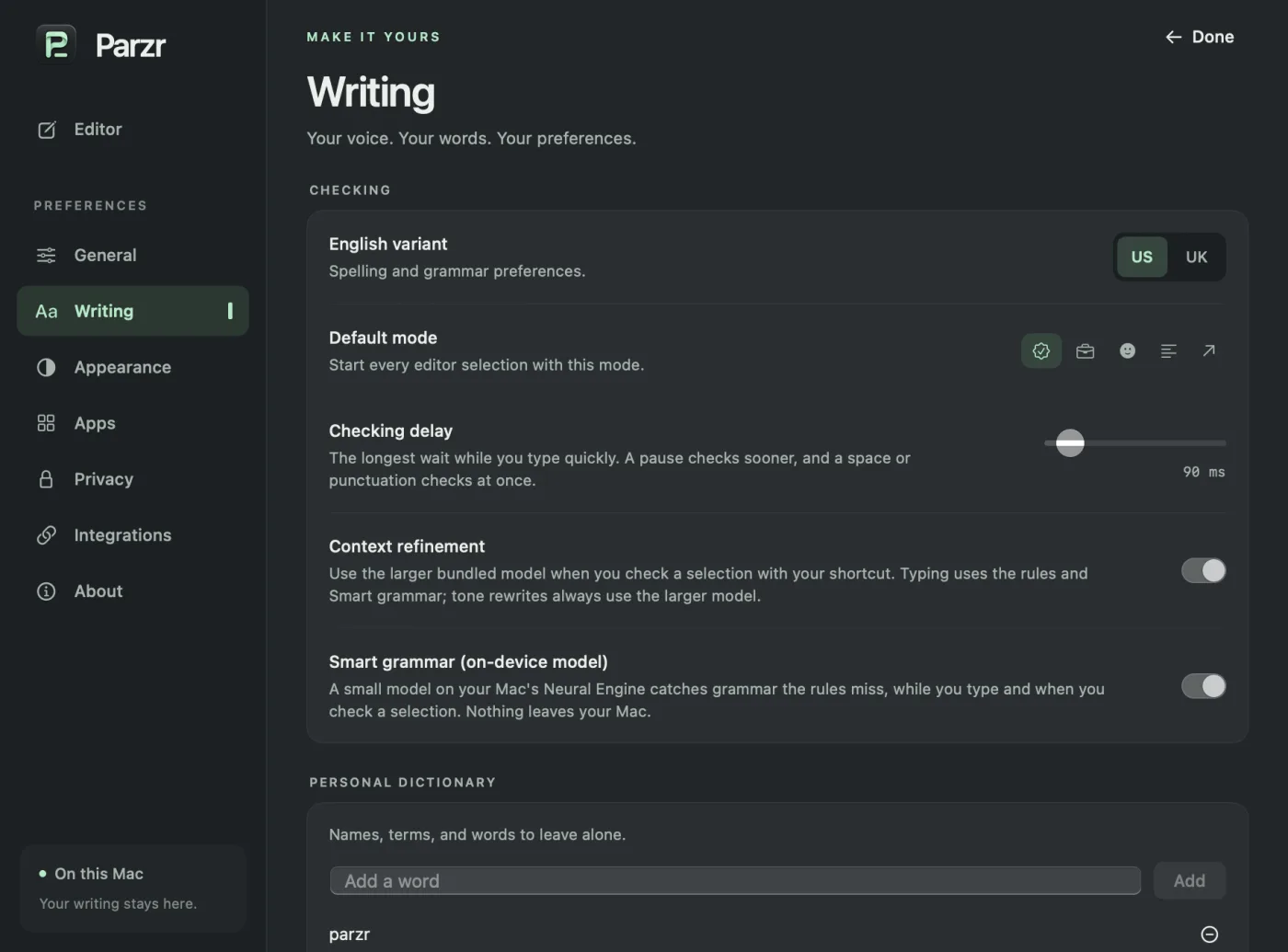
The Parzr Writing settings screen: English variant, default mode, checking delay, context refinement, Smart grammar (on-device model) and a personal dictionary.
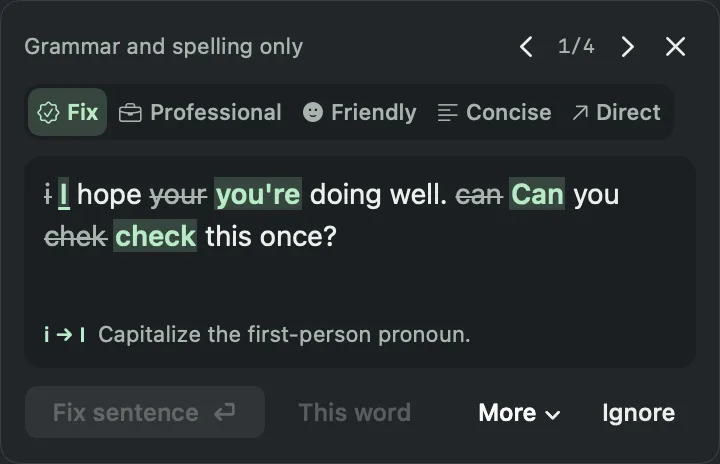
The selected-passage correction card with the labelled modes Fix, Professional, Friendly, Concise and Direct, the corrected sentence, and the Fix sentence, This word and Ignore actions.
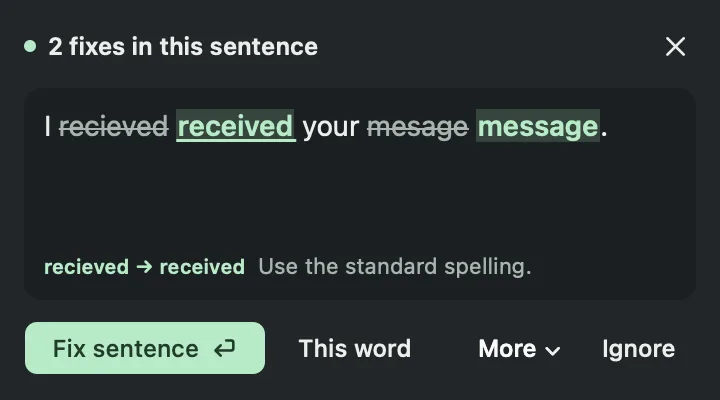
The correction card: 2 fixes in this sentence, recieved and mesage struck through with received and message in mint, and the labelled actions Fix sentence, This word, More and Ignore.

Compatibility

Works where you write.

No extension required. Parzr is honest about what has been tested: TextEdit has passed capture, selection, formatting and Undo end to end. Other apps use the same Accessibility route and have not all been tested.

Browsers, through macOS Accessibility
  • Safari
  • Chrome
  • Brave
  • Edge
  • Arc
  • Firefox
Mac apps and Electron apps
  • TextEdittested end to end
  • Mail
  • Notes
  • Slack
  • Teams
  • Discord
  • WhatsApp
  • Telegram

Google Docs

Google Docs draws text on a canvas, so macOS Accessibility sees no document text until you turn on Docs' screen reader and braille support once (Tools, Accessibility). Then Parzr underlines, corrects and fixes inside Docs as you type, tested in Chrome. Without it, Option+Space copies your selection, checks it, and pastes the fix. Other canvas editors use Option+Space too.

Optional extensions, never required

  • Browser extensionChrome, Edge, Brave, Chromium and Firefox. For web editors Accessibility cannot read or edit. Activated per page.Download .zip
  • VS Code extensionReal squiggles and quick fixes for plaintext, Markdown and commit messages, plus forks where their APIs permit.Download .vsix
  • Language serverNeovim, Emacs, Zed, Helix and Sublime, set up per editor.

Safari uses the native accessibility route; there is no Safari extension. The buttons download the newest release's files; the guide has the install steps. Read the install steps and the full evidence table.

Open source

Read every line.

Apache-2.0. A Rust grammar engine, a Swift app and four local models, all in one public repository. Every rule ships with a positive and a negative example, and its provenance. The GECToR weights Parzr downloads are for non-commercial use, and Parzr is free.

GitHub
Build from source
Terminal
python3 scripts/build.py
open dist/Parzr.app
python3 scripts/package.py

Needs an Apple Silicon Mac on macOS 13+, Xcode command-line tools with Swift 6+, Rust 1.91+ and Python 3.11+.

engine/rules/grammar.json

{
  "id": "grammar.your_doing",
  "pattern": "(?i)\\b(?:I hope|hope|I think) (?P<target>your)(?: doing (?:well|great)| having a)",
  "replacement": "you're",
  "category": "Grammar",
  "confidence": 0.98,
  "reason": "Use you're (you are) before this predicate.",
  "provenance": "parzr original rule",
  "positive": "I hope your doing well.",
  "negative": "Thank you for your doing this manually."
}

Free · Apple Silicon · macOS 13 or later · Signed and notarized

Public beta. English coverage is growing, and Parzr will not catch every error.